Saturday, February 9, 2008

Research Your Roots!

Learn how to research your family history by using two genealogy databases: HeritageQuest Online and Ancestry Library Edition. Each database complements the other by combining thousands of digital, searchable historical census records, key genealogy resources, and local history collections.

Heritage Quest features a search utility for genealogical books and magazines plus an index to a Revolutionary War database about individuals who served in the war and the Freedman’s Bank database which includes information about freed slaves from the Civil War. Both databases include information about the US Census. Ancestry Library includes thousands of databases on everything from the California Birth Index to a list of Japanese Americans who were relocated during World War II. In addition, Ancestry Library offers a variety of charts and forms that patrons can download to print out.

Familiarize yourself with these two resources during this one-hour demonstration.

  • Address: 100 Larkin St. (at Grove)
  • Location: Main Library Training Center (5th Fl.)
  • Event Date and Time: Wednesday, February 13 (6 to 7 p.m.)
  • Saturday, February 2, 2008

    Using Microfilm and Microfiche

    The Herb Caen Magazines and Newspapers Center at the San Francisco Public Library has a wealth of archived newspapers and magazines. You can find an obituary for a long-lost relative or read the gossip columns when Clark Gable came to town. Discover the price of a TV in 1970 or learn about the news on the date of your birth. In a digital age where so much information is easy to find on the Internet, it is easy to overlook this vast collection of resources.

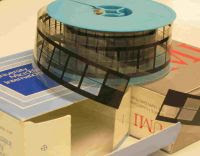
    There are different kinds of micro-formats. The library has magazines, journals, and newspapers on microfiche (a celluloid index card) and microfilm (a roll of celluloid film). The microform readers in the Center can be used to view either format.

    To use the microform viewing equipment:

    1. Choose whether you will be using the machine for microfilm or microfiche.
    2. Check to see that the machine and printer are turned on.

    To use the machine for viewing microfiche:

    1. Push the rectangular microfilm carrier all the way back. Bring the glass microfiche tray to the right and slide it forward.
    2. Lift the top of the glass tray and insert the microfiche card.
    3. Push the tray beneath the lit optical lens and the image will appear on the screen.
    4. Use the handle of the microfiche tray to move the image on the screen.

    To use the machine for viewing microfilm:

    1. Move the glass microfiche tray to the left and to the back.
    2. Pull the microfilm carrier to the front. Push the microfilm reel onto the left sprocket.
    3. Pull the film off the top of the roll, slide it under the left roller, underneath the glass plate, and under the right roller.
    4. Slide the film forward until it buckles against the right take-up reel.
    5. Press the front blue button to the left to get the film to “catch” onto the right take-up reel.

    Depending on the machine, the knob to advance or rewind the microfilm is either on the right side of the machine or the front.

    Options for using the machine are as follows: Different sized lenses are available. The lenses are interchangeable and can be exchanged for one of a different magnification.

    Above the lens are three wheels:
    • The top wheel rotates the image.

    • The second wheel increases or decreases the size of the image.

    • The bottom wheel focuses the image and turning it will sharpen the image.

    The Center has two kinds of microform equipment: Some of the machines are optical and will only display the film as it was photographed. The other machines are digital and allow you to print a reversed image from the screen. If the microfilm was photographed as a negative image, these machines will allow you to reverse it and print a positive image.

    When printing, make sure to use the zoom control and place your image within the crop marks on the screen. These crop marks show the boundary of what will be printed.

    If you have any questions about using the machines, you can ask one of the library staff to help you. Coming soon, the department will have microform and flatbed scanning equipment available.

    Saturday, January 26, 2008

    Election 2008

    California will be participating in the primary elections very soon. Are you curious about the backgrounds of the presidential candidates? Would you like to research more information on these potential leaders for our nation? To find more information and updated news articles, check out the Biography Resource Center:

    1. Go to the SFPL Home Page and select “Articles & Databases.” You will need a San Francisco Public Library card to access the databases from outside the Library.

    2. Under the Categories side bar on the left, select “People” then “Biography Resource Center+Marquis Whos Who (Gale).”

    3. In the “Search by Name” box, enter a candidate of your choice.

    4. Select any of the links from the list of results.

    The Biography Resource Center contains biographical profiles of prominent historical and contemporary figures worldwide. You can search by an individual’s nationality, ethnicity, occupation, and birth/death years as well as browse through topical categories. Articles are drawn from general and specialized biographical dictionaries, encyclopedias, directories, magazines, and selected Web sites.

    Saturday, January 19, 2008

    Martin Luther King, Jr.


    He has become a national and heroic symbol of the civil rights movement in the United States. He used nonviolent strategies to advance his cause for social justice and equality. He served as a minister and also earned the Nobel Peace prize in 1964. On January 21, we will honor Martin Luther King, Jr. and his laudable achievements for social equality among people of all color. To learn more about this historical leader, check out the Biographical Resource Center:

    1. Go to the SFPL Home Page and select “Articles & Databases.” You will need a San Francisco Public Library card to access the databases from outside the Library.

    2. Under the Categories side bar on the left, select “People” then “Biography Resource Center+Marquis Whos Who (Gale).”

    3. In the “Search by Name” box, enter “Martin Luther King.”

    4. Select the link for “King, Martin Luther, Jr. (American civil rights activist, 1929-1968).”

    Below is a citation and excerpt from one of the many links:

    "Martin Luther King, Jr.," in American Decades. Gale Research, 1998.

    “In the years since his assassination on 4 April 1968, as he stood on the balcony of the Lorraine Motel in Memphis, Tennessee, Martin Luther King Jr. has evolved from a prominent civil rights leader into the symbol for the civil rights movement in the United States. He is studied by schoolchildren of all backgrounds; his words are quoted by the powerless and the powerful, by anyone who has a dream to make her or his life better, to better the nation, or the world.”

    The Biography Resource Center contains biographical profiles of prominent historical and contemporary figures worldwide. You can search an individual’s nationality, ethnicity, occupation, and birth/death years as well as browse through topical categories. Articles are drawn from general and specialized biographical dictionaries, encyclopedias, directories, magazines, and selected Web sites.

    Saturday, January 12, 2008

    A History of San Francisco's Tenderloin District


    The Magazines and Newspapers Center will present a program—A History of San Francisco’s Tenderloin District--hosted by Peter Field, City Guide leader of many popular walking tours through the Tenderloin.

    Known to early San Franciscans as St. Ann’s Valley, this once-placid piece of real estate provides us with a fascinating microcosm of urban history as we follow its turbulent passage from quiet respectability to entertainment center to vice-ridden “mean streets,” to its present partial reinvention as “Little Saigon.”

    Mr. Field worked in the Tenderloin as a community mental health worker for more than a decade, and has spent several years researching its history and volunteering with San Francisco City Guides.

    - Address: 100 Larkin St. (at Grove)
    - Location: Main Library, Latino/Hispanic Community Room
    - Event Date and Time: Saturday, January 19 (10:30 a.m. to noon)

    Saturday, January 5, 2008

    Introduction To Genealogical Research

    New to genealogy and wanting to find your connection to the people who brought you into this world? Interested in knowing your parents, their parents, the people they loved, and the people whom they shared their lives with?

    Researching into your genealogy is more than a detective story that grows and flowers. It is a story you write backwards, and it includes the struggles, victories, and defeats of the people closest to you.

    The Magazines and Newspapers Center holds a variety of helpful resources, but so many tools can be overwhelming. To help guide your research, the Center will offer an introductory class on genealogical research including a brief introduction to genealogical research and a demonstration of the library’s relevant databases. The class will conclude with a short tour of the print and microfilm resources in the Magazines and Newspapers Center.

    - Address: 100 Larkin St. (at Grove)
    - Location: Main Library Training Center (5th Fl.)
    - Event Date and Time: Wednesday, January 16 (6 - 7 p.m.)